
Tag Archive for: Friction

Person at desk with laptop, leaning back comfortably while speaking, hands gesturing naturally away from keyboard in a bright home office workspace

I’m so bad at spelling that I’m actually better at grammar; using a semicolon is easier than remembering whether I comes before E. As a result of my terrible spelling and tendency to avoid frustration, I’ve been trying to dictate my writing since middle school. If you’ve ever wondered how many children gleefully received Dragon Naturally Speaking as a Christmas gift, the answer is at least one. But regardless of how much I read to my computer, it wasn’t until this year that I finally found the dictation experience I’ve been searching for.

Read more
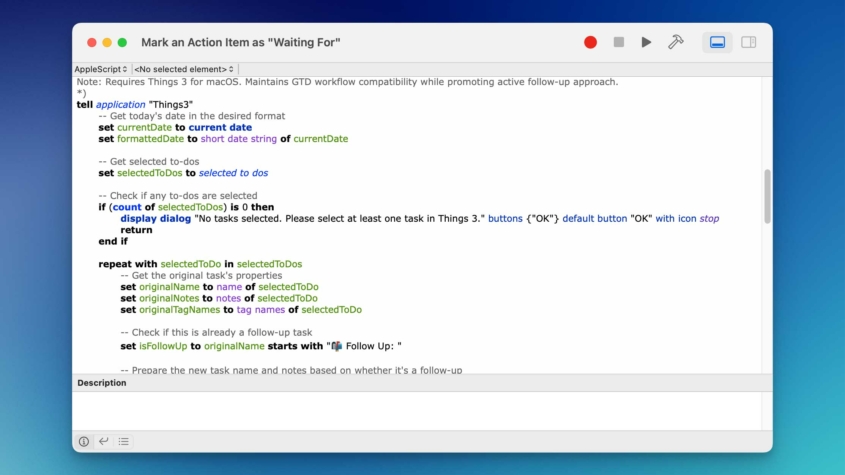
A macOS script editor window displays an AppleScript titled "Mark an Action Item as 'Waiting For'." The script automates task management in the Things 3 app by retrieving the current date, selecting to-dos, checking for selected tasks, and handling follow-ups. The code is color-coded, with keywords in blue, variables in green, and strings in purple. The interface includes standard toolbar icons and a description field at the bottom.

A major component of my job is asynchronously collaborating with other people, usually subject matter experts from whom I need to get additional information or content approval on something I have created.

All of my project templates have this approval process built in at the appropriate points. This creates a common challenge: the people I’m working with are often overworked or get appropriately distracted by dealing with some type of emergency at work, and reviewing a script for the trainer gets put on the back burner. So, tactful follow-up is a critical skill and often something I’m managing across multiple people and projects at the same time.

Read more
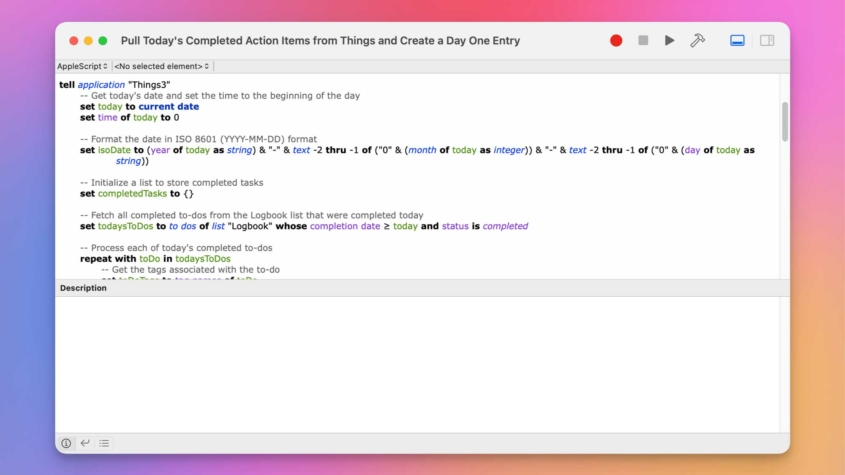
A screenshot of an AppleScript editor window titled "Pull Today's Completed Action Items from Things and Create a Day One Entry." The script is designed to retrieve completed tasks from the Things3 app and create a Day One journal entry. The script contains code to set the current date, format it in ISO 8601 format, initialize a list of completed tasks, and fetch tasks from the "Logbook" list. Syntax highlighting shows text in different colors: green for comments, blue for commands, and purple for logic conditions.

Balancing life’s necessary chores with meaningful progress toward our goals can be challenging, especially when greeted by an overflowing task list each morning.

To tackle this, I’ve been exploring ways to not just manage my tasks in Things but also to ensure I’m making real headway on projects that matter. In this post, I’ll show you how an AppleScript is helping me do just that.

Read more
This is a digital graphic featuring an app icon set against a wavy brown and white abstract background. The app icon is bright orange with the image of a bar chart that transitions into a fork on the right side, symbolizing a focus on food, nutrition, or dining metrics.

Growing up, I was a jock who was secretly a nerd. I played sports year-round and even conned my way into having an independent study gym class my senior year.

That level of physical activity plus a teenage metabolism meant that there would be no consequences for having a three-course cheesecake meal at The Cheesecake Factory with my friends.

Unfortunately, after my athletic career ended and my metabolism changed, my eating habits didn’t, and I gained approximately 50 pounds over the next 15-ish years.

Read more
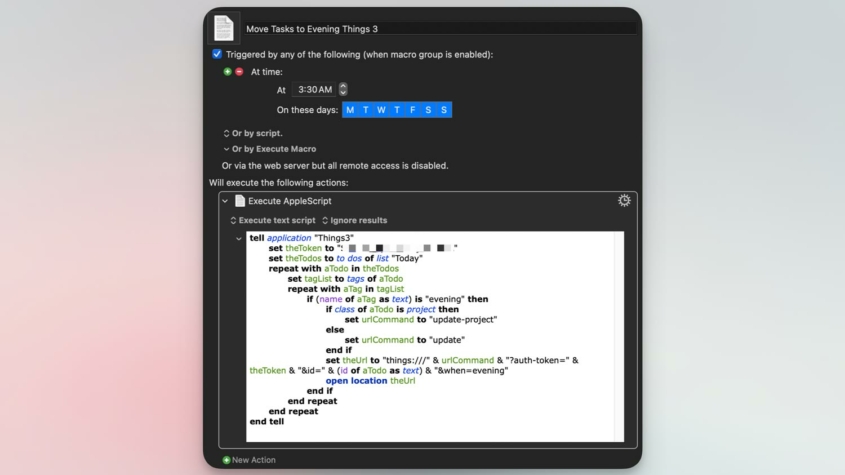
Screenshot of a user interface for automation setup, with options to trigger actions at a specified time or by script. The focus is on an AppleScript code snippet, partially redacted, which interacts with the "Things3" application. It includes logic to handle tasks, involving tokens and URLs for updates, with conditions based on task properties such as whether a tag's name is "evening" or if a task is a project. The script is designed to automate task management based on time of day.

One of the most common issues I see fellow Things users complain about on the Things Sub-Reddit is the frustrating experience with repeating tasks and the evening section of the Today view.

I always forget that this is an issue for people because I automated a solution long ago. Let me show you how.

Read more